Case Study · 02 · AI · SaaS

AI-Powered
Email Health

A 1-sprint R&D at Keap/Thryv giving users the tools to stay out of spam, turning an opaque email-health report into clear scores, organized categories, and AI-powered guidance.

RoleProduct Designer
DurationApril 2025 · 1 sprint
ToolsFigma · Lucidchart
FocusEmail Deliverability · AI
48.8
Baseline SUS
(failed)
6
In-depth
interviews
3
Actionable
categories
0–100
New health
score
Context1-sprint R&D at Keap/Thryv. In review · validation with the team to follow.
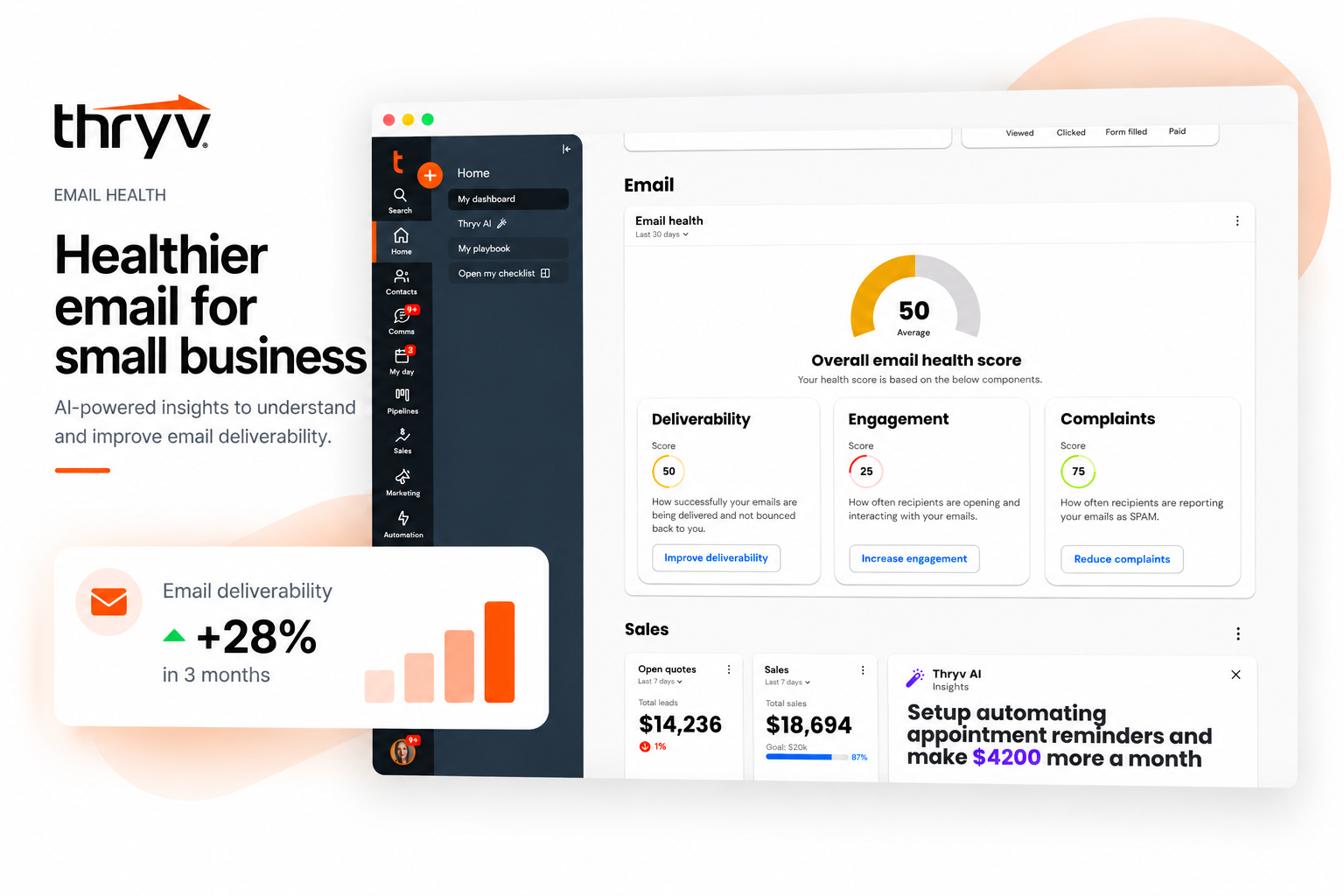
Email Health — project cover
01

Giving users the tools to stay out of spam

During a 1-sprint R&D, the goal was to help users understand and improve their email deliverability in the Keap/Thryv app. Previously, users had little insight into how their emails were performing, making it hard to catch issues before campaigns got suspended.

We ran rapid research to uncover pain points, then designed and tested a new Email Health experience that breaks performance into three actionable sections (Deliverability, Engagement, and Complaints), giving users clear guidance to protect their sender reputation and build long-term success.

The problem
Users lacked the visibility and tools to monitor email health, leaving them vulnerable to deliverability issues, spam complaints, and reliance on support to resolve problems.
The opportunity
Improve transparency, offer proactive guidance, and simplify key health metrics, helping users protect their sender reputation, reduce support needs, and boost email performance.
Platform alignment
As Keap and Thryv move toward a unified platform, introduce a smarter, more actionable email-health report that combines Keap's strengths with new improvements for all users.
My responsibilities
Competitive analysis · design-thinking workshop · wireframes → prototypes · usability testing · design iterations · stakeholder collaboration.
Voices from users

"I just stopped being able to send emails one day — no warning, no explanation. I had to dig through support just to figure out what happened."

"Managing bounces and bad contacts feels like guesswork. I want clear steps or suggestions, not just trial and error."

"There's no way for me to see if something's wrong with my list until it's too late. I wish the system gave me a heads-up."

AI · R&DEmail DeliverabilityKeap / ThryvSaaS0→1 Feature
02

Understanding what users need to protect their reputation

How might we help users better understand and manage their email health to improve deliverability, reduce spam complaints, and minimize reliance on support?
— Research question

A baseline usability test scored the existing experience at a 48.8 SUS, a failing grade, well below the "excellent" target. To understand why, I ran 30-minute in-depth interviews with six users. Three usability issues surfaced clearly.

01 · Unclear bounce warnings
Users aren't notified early about high bounce rates, leading to confusion when emails or campaigns are suddenly suspended.
02 · Manual email cleanup
There's no automated way to handle invalid emails, forcing users to clean up their lists by hand.
03 · Limited reporting
Users lack detailed analytics and actionable insights to improve deliverability and engagement over time.
Baseline SUS
48.8, failed. The current widget and report set a low bar, giving clear headroom for a redesign to prove impact against.
Competitive analysis

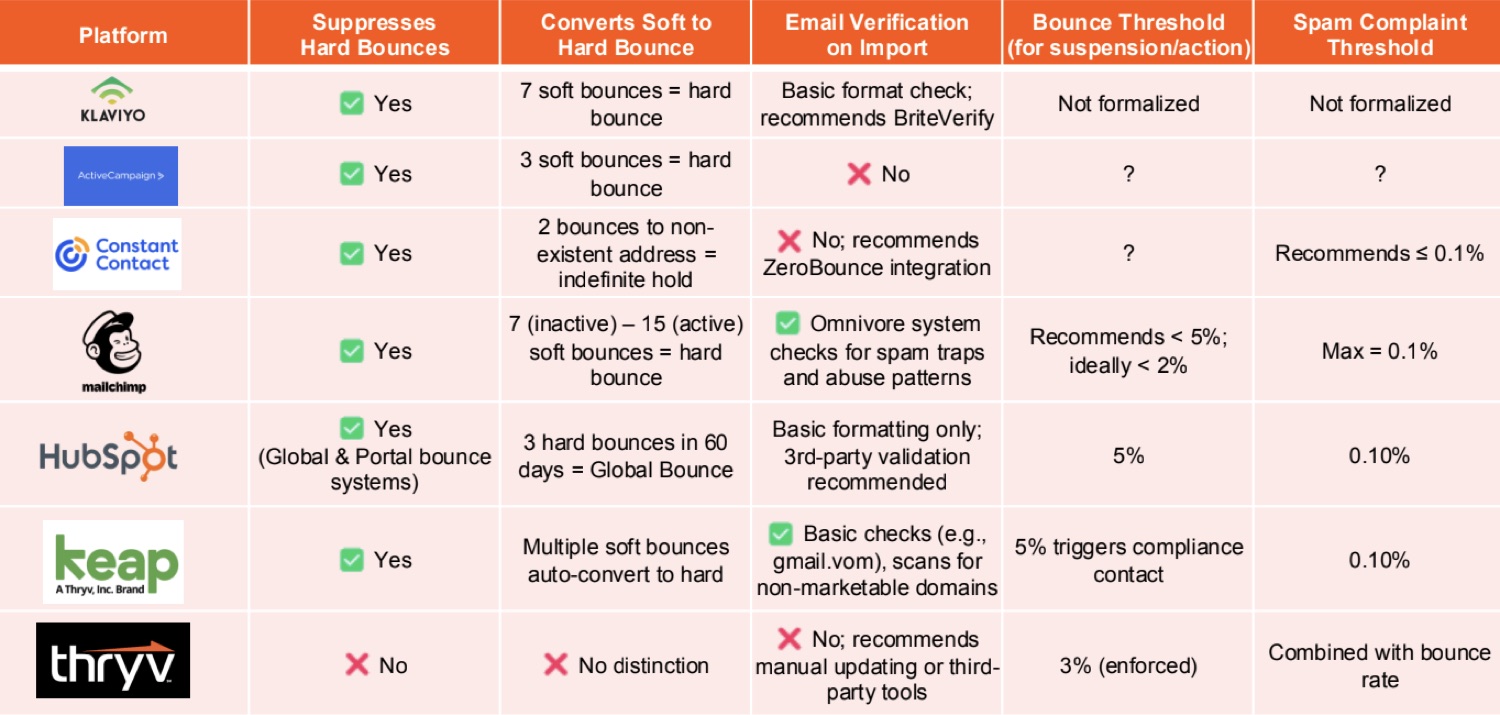
Most tools manage email health proactively: bounce suppression, soft-bounce thresholds, and email verification. Keap/Thryv lacked these safeguards: no automatic suppression, unclear thresholds, and limited verification, leaving users more exposed to deliverability issues.

Competitive analysis: Keap/Thryv email health vs top competitors
Competitive benchmarking: Keap/Thryv email-health features mapped against top competitors to find gaps and differentiation.

✓ Keap strengths

  • Strong built-in email-health diagnostics and monitoring
  • Automated email list cleaning and maintenance
  • Clear feedback loops for performance tracking
  • Foundation for AI-powered engagement suggestions
  • Compliance optimization through intelligent recommendations

✗ Thryv gaps

  • Transparency: no warnings before email blocks
  • Diagnostics: no tools for troubleshooting deliverability
  • Automation: invalid contacts aren't flagged early
  • Support: list cleanup requires manual effort
  • Usability: lack of proactive feedback creates friction
Design-thinking workshop

A cross-functional team (designers, a content designer, researcher, PM, and customer-success manager) aligned on the core challenges and explored early solutions, focused on empowering users with insight, guidance, and control.

Empathize

Where users get stuck

Reviewed journeys, interviews, and data. Found users lack visibility, face inconsistent compliance, and rely on manual support.

Define

The real pain points

Low awareness, unclear resolution paths, limited best-practice guidance, and list-management gaps.

Ideate

Directions to explore

In-app alerts, guided cleanup tools, educational content, and proactive warnings before problems escalate.

03

Clear score, organized categories, AI-powered insights

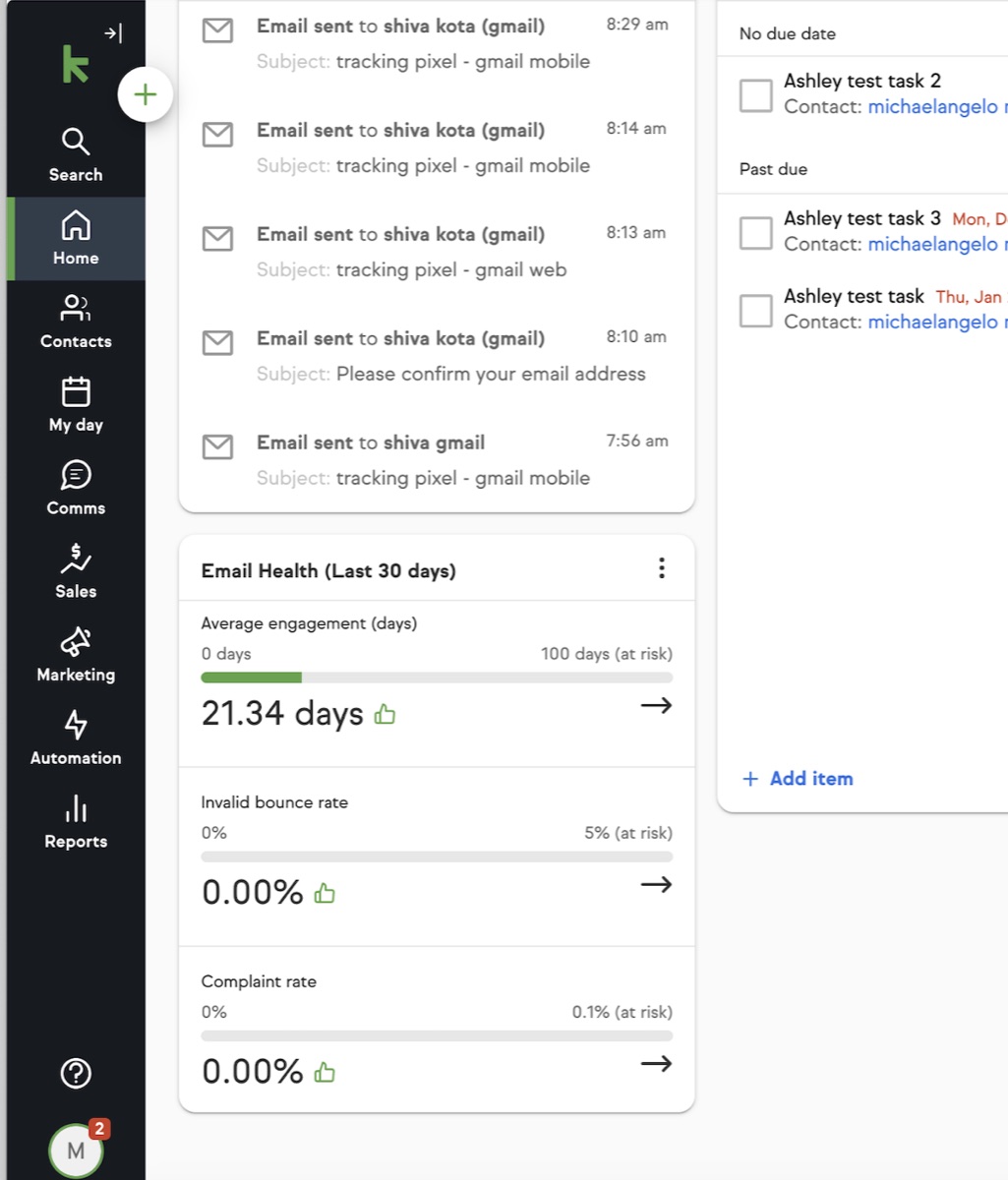
Auditing the current experience exposed the root problems: metrics with no meaning ("average engagement (days)"), weak visual hierarchy, misleading icons, no trend visibility, and no next step when something went wrong. I scoped an MVP around a clear health score and rebuilt the widget and report around it.

Email Health widget · before & after
Before · current widget
Current email health widget
Confusing metrics, unclear guidance, poor visual hierarchy.
After · redesigned widget
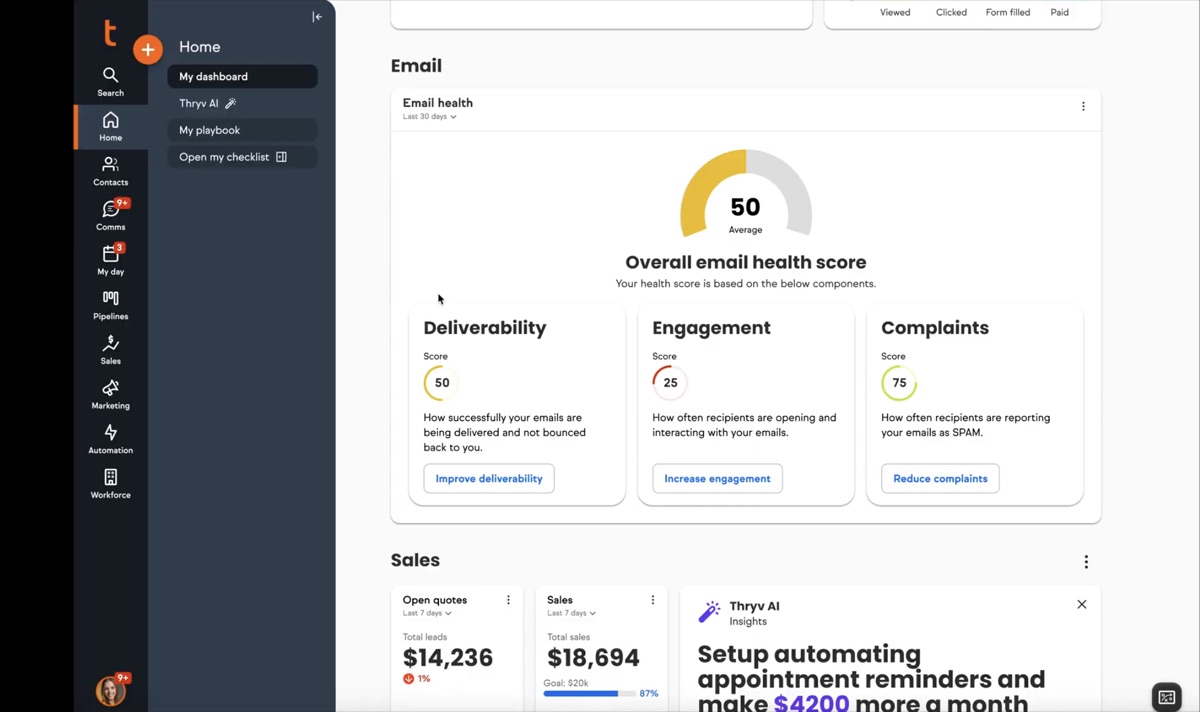
Redesigned email health widget
Clear health score, organized metrics, actionable insights.
  • Clear health score (0–100) for at-a-glance understanding
  • Organized categories: Deliverability, Engagement, Complaints
  • Visual progress indicators for each metric
  • Actionable buttons for direct problem resolution
  • Eliminated the confusing engagement-time metric
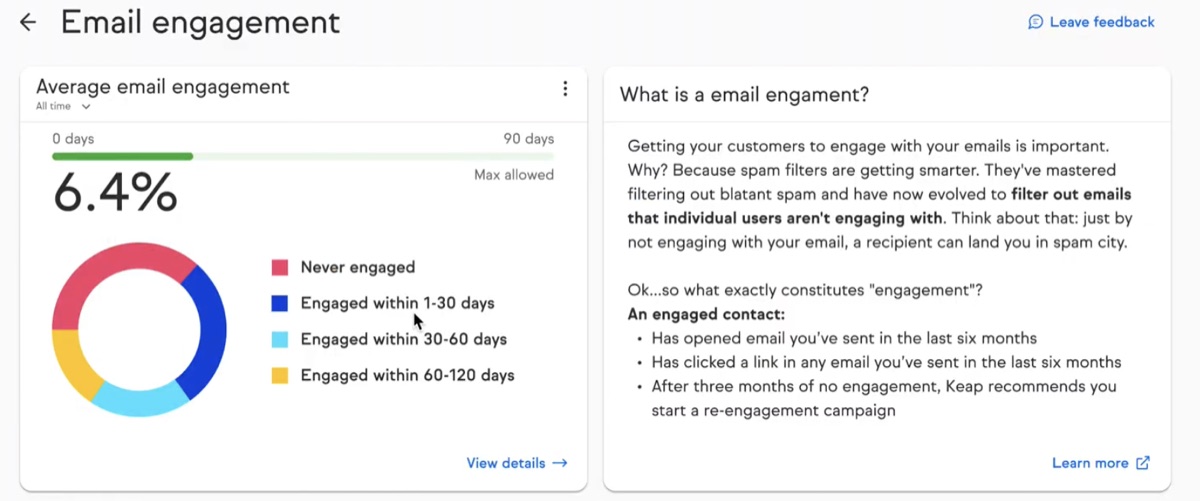
Email report · before & after
Before · current report
Current email health report
Confusing 6.4% metric, text-heavy explanations, buried action items.
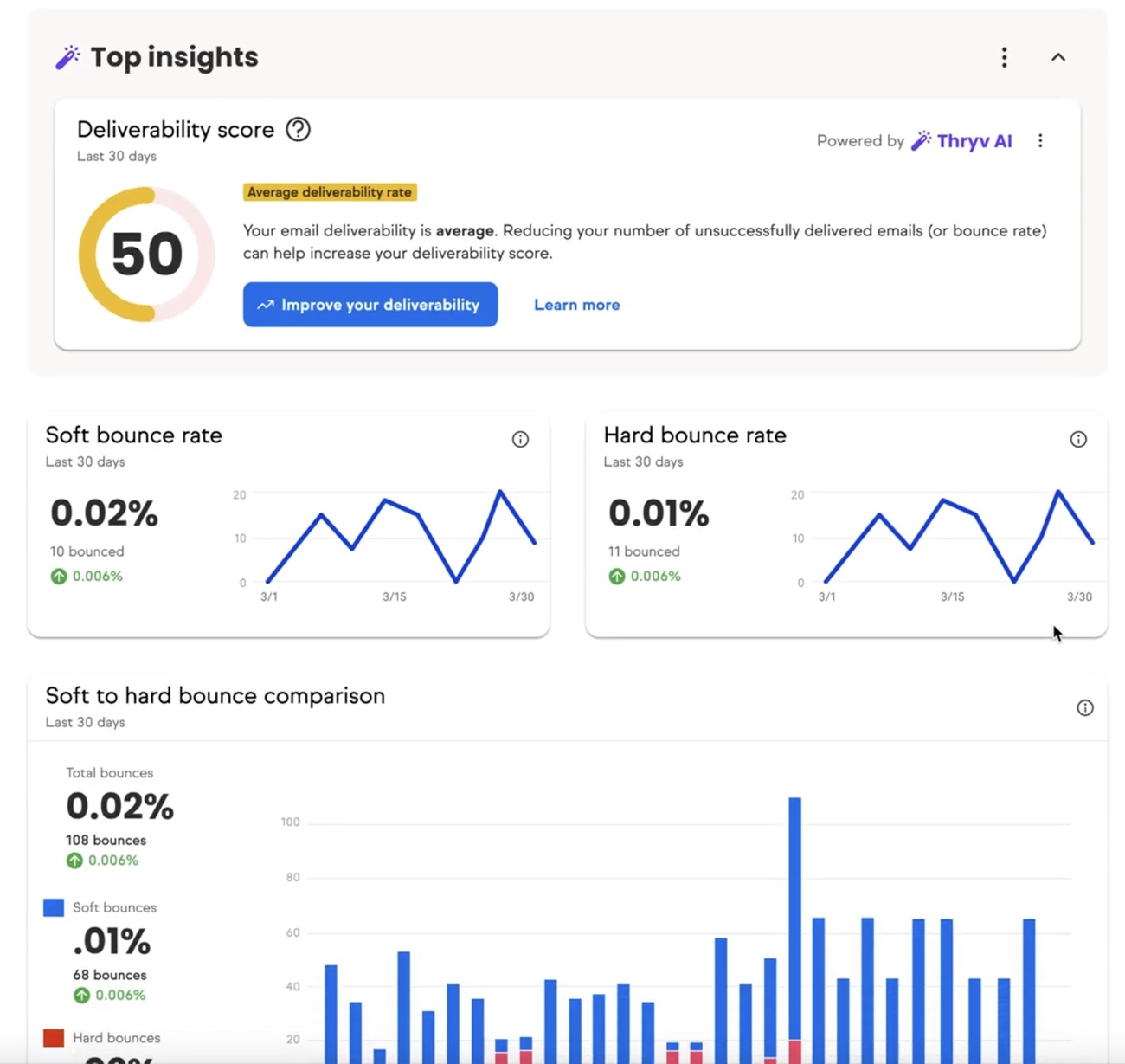
After · AI-powered insights
Redesigned AI-powered email report
Clear deliverability score, AI recommendations, trend visualizations.
  • AI-powered insights with personalized recommendations
  • Clear deliverability score (0–100) prominently displayed
  • Trend visualizations for bounce rates over time
  • Detailed bounce-rate breakdown (soft vs. hard)
  • Visual hierarchy that highlights the most critical metrics
The three factors of email health
Deliverability
How many emails successfully reach inboxes.
Engagement
How recipients interact (opens, clicks, replies).
Complaints
How often recipients mark emails as spam or unsubscribe.
Interactive prototype in context

A walkthrough of the redesigned experience living inside the existing Keap CRM, surfacing the health score, category breakdowns, and AI recommendations without pulling users out of their daily workflow.

View prototype walkthrough ↗
04

AI interface concepts, in context

To push the experience further, I designed three AI-powered interface concepts showing how intelligence can provide contextual assistance and streamline workflows without pulling users out of their day-to-day.

01

AI side-panel assistant

A contextual side panel offering real-time recommendations and insights based on the user's current email-health data and workflow.

02

AI-powered homepage

A homepage that surfaces the most relevant email-health insights, prioritizes critical issues, and recommends personalized actions from behavior patterns.

03

Multi-agent workflow assistant

A workflow agent that acts autonomously to identify patterns, suggest optimizations, and streamline complex processes to improve email performance.

▶ AI concept walkthroughs Click a tab to play each concept
Contextual intelligence
Relevant insights and recommendations from real-time data and user context.
Automated workflows
Intelligent automation reduces manual tasks and streamlines management.
Predictive insights
ML identifies patterns and predicts issues before they hurt deliverability.
05

Seamless integration & measuring success

The prototype demonstrates how these improvements live inside the existing Keap CRM workflow, surfacing actionable insights without disrupting daily tasks. Each report pairs data visualizations with AI-powered recommendations so users can spot and fix issues in place.

  • Email-health monitoring within contact workflows
  • Contextual insights during campaign management
  • Real-time alerts for deliverability issues
  • Automated list-cleanup suggestions and in-context AI recommendations
Next steps

After the 1-sprint R&D, the next step is refining the prototype with the Reporting Center and Email Deliverability teams: assessing feasibility, aligning on priorities, and defining technical requirements for implementation.

KPIs to measure success
Performance
Improved email performance
Higher deliverability, open, and click rates; reduced bounces and spam complaints.
Support
Lower support burden
Fewer tickets related to bounces, suspensions, and deliverability issues.
Adoption
Increased feature adoption
More users engaging with email-health tools, recommendations, and campaigns.
Satisfaction
Stronger user satisfaction
Positive feedback and usability gains from ongoing UX research.
AI · R&DEmail DeliverabilityUsability TestingDesign SystemsKeap / Thryv